Claude Connector (MCP)
The DebateCardAI connector plugs Logos into Claude, so your AI can search the same million-card evidence library from inside a conversation. You ask for cards the way you would say it out loud; Claude runs the search itself and pulls the full text only for the results worth keeping. It works over MCP (Model Context Protocol, the standard way to plug an outside tool into an AI), so you add it once in Claude's connector settings and it is available in every chat after that.
What Claude can search
The connector reaches the same library the Logos tab reaches: cards that other debaters cut and published on OpenCaselist, refreshed on a weekly cycle. Nothing is generated; every result is a real card a real team disclosed.
Claude gets two tools, and it decides which to call:
search_logosfinds cards. It searches taglines by default, or block headings like "AT: Cuba DA" when you ask for a whole answers-to block. It can narrow by event (PF, LD, or Policy), side, season, school, and the date range the card was cut in.get_full_cardopens specific cards by id and returns the full body plus the source URL, up to ten at a time.
How the two-step search keeps results small
A full debate card is mostly shrunken 8pt text that nobody reads aloud, so handing whole cards to an AI burns the conversation's memory on words you do not need. The connector splits the job in two.
The first step returns a digest of each card: the tagline, the citation, the highlighted read text (the part that actually gets read in a round), and the school, team, side, season, and event it came from. A digest is roughly 10 to 20 times smaller than the full card, so Claude can scan a screen of results in the space one raw card would take, then throw out the ones that miss.
The second step fetches the full body and source URL, and only for the cards that survived the first step.
Results are grouped, so when several teams cut the same card you see it once with a variant count next to it. Read that number honestly: it is how many cuts of that card turned up in the window Logos scanned for this search, which can be higher than the number of results you see. It is not a census of the whole library. A high count still tells you a lot of teams leaned on that card.
Verify before you read it
Wiki cards were cut by other teams, for their own case. Miscuts are common: text highlighted out of context, or a citation that does not match the article it points at. The connector says this in every result it hands Claude, and it is worth repeating here.
Before you read anything from the connector in a round, open the source URL from get_full_card and check the quoted text against the original word for word. Treat what comes back as a menu of leads, and verify the one you pick.
Setting it up on claude.ai or the Claude desktop app
Custom connectors are available on a paid Claude plan, so you need one of those first. You also need your personal connector URL, which lives in your DebateCardAI Settings → Claude Connector. In Claude, open Settings, go to Connectors, and click Add custom connector. The dialog that opens looks like this:
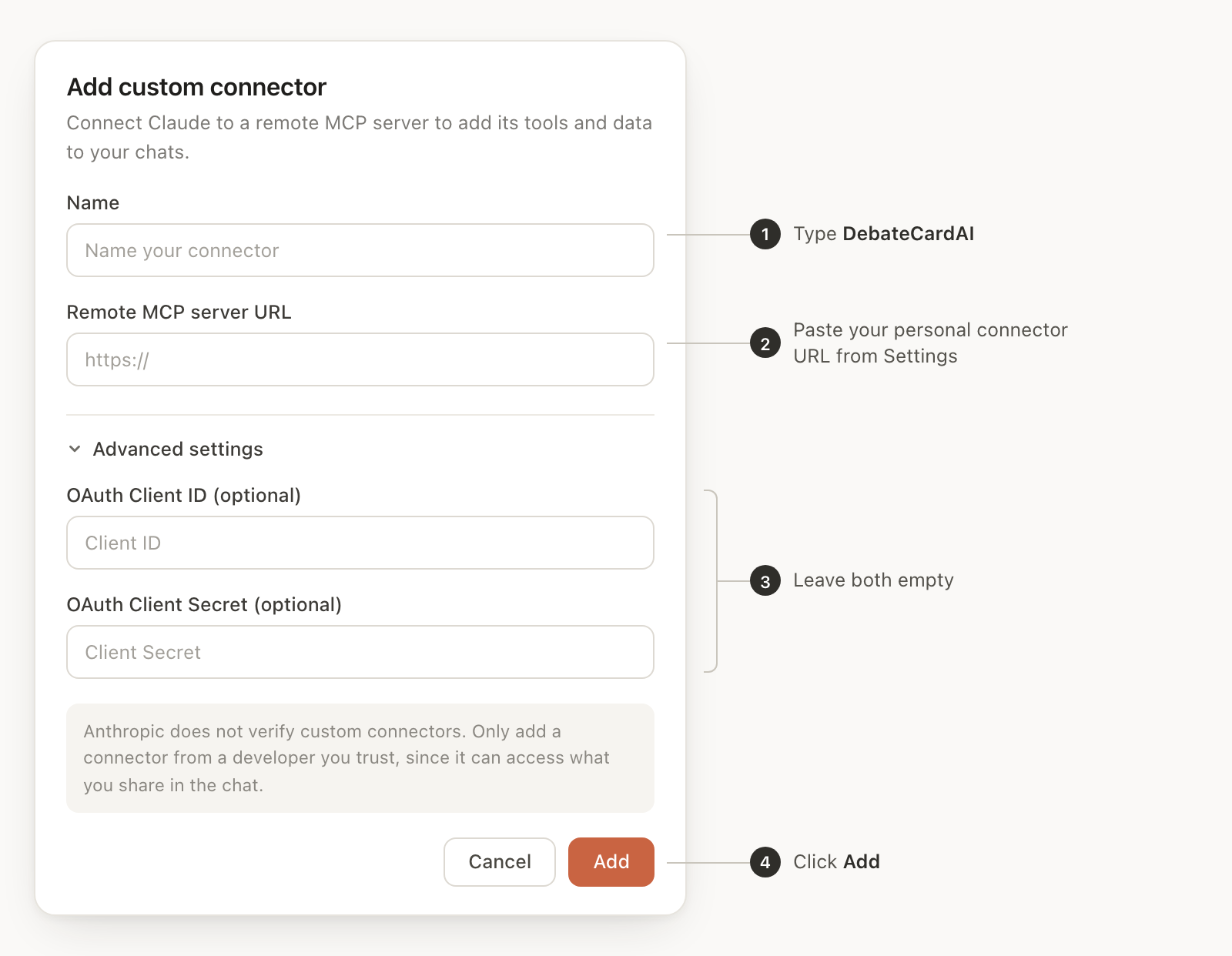
- Name: type
DebateCardAI. - Remote MCP server URL: paste your personal connector URL.
- Advanced settings: leave the OAuth Client ID and Client Secret empty. Your URL is what authenticates you.
- Click Add.
Claude connects, reads the two tools, and lists DebateCardAI with your other connectors. You do this once per Claude account.
If you use Claude Code (the terminal version of Claude) instead, you do not need separate steps: click Copy page at the top of this doc, paste it into Claude Code, and ask it to set the connector up. It will run the right command from these instructions.
If Claude shows a sign-in error
While adding the connector, Claude sometimes shows an error like "Couldn't register with DebateCardAI's sign-in service. You can try again, or add an OAuth Client ID in the connector settings." This is a known glitch in Claude's connector setup, not a problem with your URL, and adding an OAuth Client ID is not the fix. Do this instead:
- Close the error.
- In Claude's Settings → Connectors, remove the DebateCardAI connector.
- Click Add custom connector and paste the same URL again, leaving the OAuth fields empty.
It usually connects on the second try. If it fails again, wait a minute and repeat the remove-and-re-add once more.
If DebateCardAI does not show up
Open a new conversation and check the tools or connectors list there; a chat that was already open when you added the connector will not pick it up. If it is still missing, make sure the URL was pasted whole, with nothing cut off the end, since a truncated URL fails to authenticate. Removing the connector and adding it again with a fresh paste clears up most of what is left.
What to ask once it is connected
Ask in normal sentences; Claude picks the tool and the filters. Some asks that work well:
- "Find me answers to an economy advantage, PF only, this season."
- "What are teams reading against the states counterplan this season?"
- "Pull the full card for #3 and give me the source link so I can check it."
You can also chain them: ask for twenty digests on an argument, tell Claude which three look strongest, and have it fetch the full text of those three for you to verify.
Availability
The connector is a Pro feature. Your personal connector URL lives in your DebateCardAI Settings → Claude Connector; open that tab and copy it from there. See Plans & Limits for what Pro includes.
It caps out at 300 searches and 150 full-card fetches per day. Those limits exist to stop bulk scraping, not normal use; a typical prep session will not come close.
Treat your URL like a password - do not share it with anyone. If it leaks, replace it from Settings and the old URL stops working.
Related
- Logos: the same library, searched from the app instead of from Claude.
- Logos Deep Search: describe an argument in plain English and get ranked cards, inside the app.
- Plans & Limits: what Pro includes.